
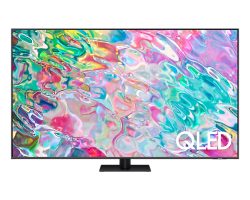

| Brand | Unbranded |
| Manufacturer | Unbranded |
| Model Number | QA65Q70BAWXXY |
| Display Resolution | 4K Ultra HD |
| Display Technology | QLED |
| HDR Support | HDR10, HDR10+ |
| Screen Size | 61 Inches - 78 Inches |
| Smart TV Platform | Tizen |
QLED powered by Quantum Dot Motion Rate 200 AirSlim Design AI Upscaling QLED 4K Smart TV - Q70B Long-lasting brilliance, colourful possibilities Every scene can look amazing, with astounding Quantum Dot colour on Q70B QLED TV.* Motion Rate 200 helps keep fast-moving images sharp and clear, and with its sleek AirSlim profile, your TV is designed to look as amazing as it performs. * Picture quality may vary depending on quality and resolution of source content. * Source - Omdia , Jan 2022.
Results are not an endorsement of Samsung. Any reliance on these results is at the third partys own risk. Unleash cinematic colour with Quantum Dot QLED powered by Quantum Dot Samsung QLED TV's Quantum Dot technology delivers a billion shades of colour and incredible contrast in a variety of lighting conditions - allowing you to discover details you havent before. *Screen image simulated for illustrative purposes.
Clarity in motion Motion Rate 200 Keep up with fast-paced sports and action movies. Samsungs Motion Rate 200 helps you experience smooth, clear motion through the most dynamic of scenes. Sleek lines, effortlessly stylish design AirSlim Design The stylish AirSlim design makes this TV the perfect complement to any home.
At just 26mm thin, it boasts an incredibly thin profile that is designed to blend in seamlessly. And with no bulky bezels and built-in cable management to help reduce clutter, you can enjoy the action without distraction. Profile view of TV shows ultra slim design of TV AirSlim. * Cable, stand and/or neck not shown.
Upgrade your content AI Upscaling Thanks to the power of AI upscaling, your TV is designed to upgrade your favourite content to 4K resolution. By helping to restore lost details, refine picture quality and reduce image noise, it can make whatever you're watching look as good as possible.* * Picture quality of upscaled content will vary depending on quality and resolution of source content. ai upscaling stop video The TV that adapts to its surrounds Intelligent Mode Your QLED TV knows how to help create an amazing entertainment experience.
Intelligent Mode uses a combination of smart sensors to fine-tune the audio, picture and brightness so that the action looks and sounds incredible.* * Picture and sound quality of upscaled content will vary depending on quality and resolution of source content. Performance may vary depending on installation environment and surroundings.
The TV thatadapts toits surroundings - Adaptive Picture Adaptive Picturetechnology automatically adjustsyour screen's brightness levels to suit the room you're watching it in. And because it optimises content, you can be sure your favourite shows are always looking incredible* * Picture quality may vary depending on quality and resolution of source content and viewing conditions.
Screen image simulated for illustrative purposes. * Cable not shown. Never miss a word - Active Voice Amplifier Whatevers happening on movie night, Active Voice Amplifierhelps ensure you never miss a word.It analyses noise levels in your room and amplifies the dialogue, so that even if the dogs barking or the kids are arguing, you can hear the words* * Performance may vary depending on installation environment and surroundings.
Easy on the eye - EyeComfort Mode EyeComfort optimises the brightness and colour of your TV for a warm and welcoming picture. By detecting local sunset and sunrise times, EyeComfort knows when you need to unwind and automatically adjusts your screen so that its softer on the eyes when you most need peace.* * EyeComfort must be activated in 'Intelligent Mode' settings. * Image simulated for illustrative purposes.
Blank to beautiful - Ambient Mode + Beautifully integrate your TV's screen to suit your tastes and interior d*cor with Samsungs Ambient Mode +. Display art, photos, time and weather or take a picture of the wall and set it on-screen, so your TV seamlessly blends in.* * Ambient Mode + performance may vary depending on where the TV is installed including wall designs, patterns or colours.
Next Experience audio in action Object & V
 Related Products
Loading similar products...




Stay informed about the best deals and price drops. Choose which notifications you'd like to receive from PriceCheck.

Free easy-to-follow course for anyone in South Africa who wants to learn how to start a digital business.


